Custom LED Display Light Leakage: Segment Walls, Windows and Optical Isolation

This guide covers what causes it, how to isolate the source with four measurements, and which corrections to verify before the tooling is signed off.
Quick Answer: What Leakage Looks Like on a Production Unit
Light leakage is any light that reaches the viewer from a path the design did not intend. The three visible forms are ghosting between adjacent digits, a glow around the window perimeter, and a general loss of contrast when the display is viewed under ambient light.
Ghosting is the easiest to recognise and the easiest to misdiagnose. A faint unlit segment can come from electrical crosstalk in the driver, from a scan artefact, or from light travelling through the plastic between two segment cavities, and the three have completely different fixes.
The first diagnostic step is therefore to separate electrical from optical causes. Disconnect the driver and illuminate the display externally, or drive a single segment with the rest of the electronics held in reset; if the leakage persists, the cause is in the optics or the mechanics.
Where It Comes From: Segment Walls, Apertures and Windows
Segment walls exist to stop light crossing between cavities. When the wall is too short, too thin, or too translucent, light exits the lit cavity, travels through the plastic and re-enters the neighbouring cavity, which then acts as a diffuser and glows.
Aperture size has a similar effect at the front surface. An aperture that is larger than the cavity opening lets the viewer see the side wall of the cavity itself, and a lit wall reads as a halo around the digit even when no light crosses into the neighbour.
| Visible symptom | Most likely source | What confirms it |
|---|---|---|
| Faint whole digit behind a lit one | Segment wall too short or too translucent | Leakage persists with the driver disconnected |
| Halo around each digit | Aperture wider than the cavity opening | Halo follows the aperture edge, not the segments |
| Glow along the window perimeter | Window gasket missing, compressed unevenly or translucent | Glow disappears when the gasket line is masked |
| Washed-out contrast in ambient light | Window material too diffusing or too reflective | Contrast improves with a dark background film but not with higher drive current |
| Leakage only at one end of a multi-digit unit | PCB or module placement tolerance | Leakage moves when the module is repositioned in the housing |
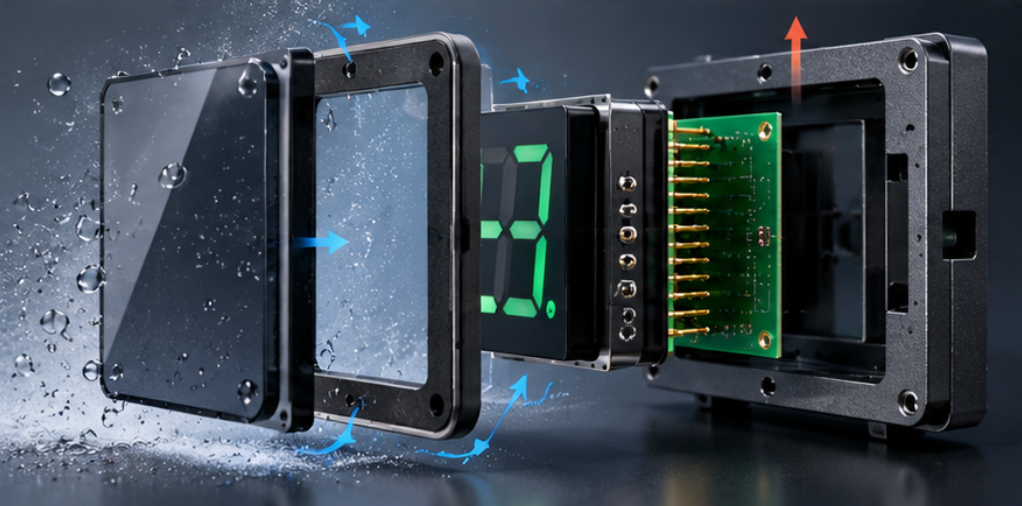
The window itself is the fourth path. A window with a diffusing surface spreads the light from each digit across a wider area, and a window with high internal reflection carries light from the brightest digit to the edge of the panel. Both are material decisions that have to be made before the tool is cut.
Gasket design belongs in the same review. A compressible gasket that is translucent, or a gasket line that is interrupted at a corner, gives light a route around the segment block and out through the window edge. Our note on custom segment LED display icons defined before tooling covers how icon geometry interacts with wall thickness, which is where many of these decisions are actually fixed.
Measurement: Isolating the Source in Four Readings
Measure in a dark room with a photometer or a calibrated camera held at the intended viewing distance and angle. Take four readings in the same session so the values are comparable.
First, with all segments off, record the ambient and reflected level: this is the baseline. Second, drive one digit and measure the adjacent unlit digit; the difference between the two readings is the leakage that causes ghosting.
Third, mask the window perimeter with opaque tape and repeat the single-digit reading. If the value drops, part of the leakage is travelling around the window edge rather than through the segment walls.
Fourth, seal the gasket line and repeat again. A further drop identifies the gasket as a contributor; no change means the remaining leakage is inside the segment block or the window material.
Record the readings as a ratio rather than a single number, because the absolute value depends on the drive current and the photometer. A ratio between the lit and unlit digit, and the contrast between a lit segment and its dark background, are comparable across builds and can be written into the drawing as an acceptance limit. Our article on how to evaluate LED display brightness uniformity describes the same measurement discipline applied to brightness rather than leakage.
Design Corrections and Their Trade-Offs
Wall height is the most effective correction and the most expensive to change after tooling. Raising the wall reduces cross-cavity leakage but increases mould complexity and can reduce the viewing angle, so the change has to be evaluated against the reading requirement.
Wall opacity can be improved without changing height by using an opaque or dark-filled material for the segment block. This is often the cheapest fix on an existing tool, provided the material change does not alter the mechanical fit or the optical diffusion the design relies on.
Aperture and background treatment are the next lever. A dark background film behind the window raises contrast without touching the emitter, and a black matrix between digits interrupts the path along the window surface. Both are drawing-level changes rather than tool-level changes.
Gasket and window material changes address the perimeter and the diffusing path. An opaque gasket and a window with lower haze reduce the halo, but a lower-haze window also makes the unlit segments more visible, which can make a display look busier when it is off.
Placement tolerance is the last contributor and the easiest to overlook. If the module sits a fraction of a millimetre off centre in the housing, the wall on one side becomes thinner in optical terms and the leakage appears at one end of the unit only.
Every one of those levers is a custom LED display design decision rather than a purchasing decision, because each changes the drawing, the tool or the material callout. OEM display integration reviews should therefore carry the leakage limit as a drawing tolerance with a measurement method beside it, not as a cosmetic note added at the end.
The Custom Display Integration sequence matters here: enclosure constraint, then dimensions and pinout, then assembly tolerance, then optical alignment, then the production drawing. Correcting leakage out of that order usually means correcting it twice.
Verification Before Tooling Sign-Off
Verify on a sample built with the production tool, the production material and the production gasket. A hand-built prototype can pass a leakage check that the moulded part fails, because the prototype has more material and tighter manual alignment.
Run the four readings on at least three units from the same tool and compare the spread, not only the average. A process with a good average and a wide spread will produce field complaints from the units at the edge of the distribution.
Repeat the measurement after a thermal cycle and after a vibration or drop test if the product will see either. Gasket compression and module seating both change after cycling, and leakage that grows after a cycle is a design problem rather than a cosmetic one.
Finally, write the acceptance limit and the measurement method into the drawing so the check survives a change of inspector. The custom LED display drawing approval process is where that limit becomes contractually testable.
Where the same leakage mechanism appears around a light pipe rather than a window, the LED display for HVAC controller light pipe integration note shows how the perimeter path is usually controlled in that variant, and the custom LED display solutions for OEM projects overview shows where the check sits in the wider project flow.

Frequently Asked Questions
What causes problems related to custom LED display light leakage?
Segment walls that are too short or too translucent, apertures wider than the cavity, and window or gasket materials that spread light are the usual causes. Placement tolerance inside the housing adds a further path that often appears at only one end of a multi-digit unit.
How to troubleshoot custom LED display light leakage in an LED design?
First separate electrical from optical causes by driving a single segment with the rest of the electronics held in reset, and confirm the leakage persists. Then isolate the optical path by masking the window perimeter and the gasket line in turn.
Which measurements help diagnose custom LED display light leakage?
Measure the unlit digit with all segments off, then with one digit driven, then with the window perimeter masked, then with the gasket sealed. The change between readings identifies which path is contributing, and the ratio between lit and unlit digits gives a value that can be written into the drawing.
How to verify the fix for custom LED display light leakage before production?
Verify on samples built with the production tool, material and gasket, and check at least three units so the spread is visible. Repeat the measurement after thermal cycling, because gasket compression and module seating both change once the unit has been through temperature.
Can light leakage be fixed by increasing the drive current?
No, because raising the current increases both the intended output and the leaked light in the same proportion. Contrast only improves when the unintended path is reduced or the background is darkened.
Conclusion: Leakage Is a Path, Not a Brightness Problem
Custom LED display light leakage is produced by a path, and every path has a measurable source: the segment wall, the aperture, the window material, the gasket line or the module position. Isolating it with four readings is faster than replacing parts, and it produces numbers that can be written into the drawing.
If you are preparing tooling for a custom display and want the wall, aperture and window scope reviewed against a leakage limit, send the leakage scope to the HOUKEM team and we will confirm what applies to your design.
LED Display for EV Charger: Specifying Readability, Sealing and Interface Fit