7 Segment Stroke Width Readability: Why Thin Segments Fail at Distance
This guide treats 7 segment stroke width readability as a ratio problem. Digit size is assumed to be settled already, because that decision belongs to viewing distance. What remains is how thick each segment should be, how much of it the front panel is allowed to hide, and how those two choices behave when the viewer is not standing straight in front of the product.
Quick Answer: The Ratio Decides, Not the Size
Readability depends on the ratio between the stroke and the digit height, because the eye judges a digit by the proportion of lit area inside a known outline. Increase the digit height without increasing the stroke and the stroke becomes proportionally thinner; the digit looks more elegant in a drawing and fainter at three metres. This is the mechanism behind the everyday complaint that thin LED segments are hard to read at a distance, even when a photometer confirms the display meets its brightness figure.
A well-proportioned numeric digit keeps its stroke near a stable fraction of its height. Move far below that fraction and the strokes stop reading as solid shapes; move far above it and adjacent segments begin to close up, which costs distinction between similar glyphs.
What Stroke Width Actually Controls
Three different things respond to the same dimension. The first is the lit area of the glyph, which sets apparent brightness at a distance. The second is the gap between adjacent segments, which sets how easily a viewer separates a "1" from a "7" or an "8" from a "0". The third is the total forward current for a given current density, which changes the driver and thermal budget.
Those three pull in different directions. A wider stroke is brighter and more legible, but it reduces the inter-segment gap and increases current. A narrower stroke is efficient and crisp at close range, but it disappears when the viewer is far away or the ambient light is high. The 7 segment segment width decision is therefore a balance point, not a maximum.
Current density adds a constraint that is easy to miss. If the same drive current is spread over a wider stroke, the current density falls and the emission per unit area drops, so a wider segment can be dimmer per square millimetre while being brighter overall. Which of those two the eye responds to depends on distance: close up it responds to luminance, far away it responds to total flux inside the recognised shape.
Stroke Width vs Digit Height in Practice
Because the ratio is what matters, the specification should be written as a ratio and then converted to millimetres for the drawing. Writing a fixed millimetre value on its own invites a future revision to keep the number and change the digit height, which silently changes the proportion.
| Digit height band | Stroke proportion that survives distance | What fails first if you go thinner |
|---|---|---|
| Compact digits under about 0.4 inch | Proportionally wider, because absolute stroke is tiny | Segment gaps close up; the glyph blurs rather than dims |
| Mid-range digits, roughly 0.5 to 1 inch | A conventional balanced proportion | Apparent brightness at two to three metres |
| Large digits above about 2 inch | Can be proportionally slimmer without losing legibility | Off-axis viewing and window masking |
The table is directional rather than prescriptive, because the usable proportion also depends on the font, the segment spacing and the contrast of the front panel. What it shows is that the same LED digit stroke width in millimetres means very different things at different digit heights, which is exactly why the ratio belongs in the drawing note.
At the compact end the limit is not brightness but separation. When the stroke grows, the gap between two adjacent segments shrinks; below a certain gap the eye merges them, and the digit becomes a solid block at any distance. Custom icon work runs into the same limit earlier, as described in custom segment LED display icons.
At the large end the limit is mechanical as much as optical. Bigger digits mean bigger modules, and the relationship between module size, digit height and mounting depth is set out in the LED display size guide.
Aperture Clipping at the Front Panel
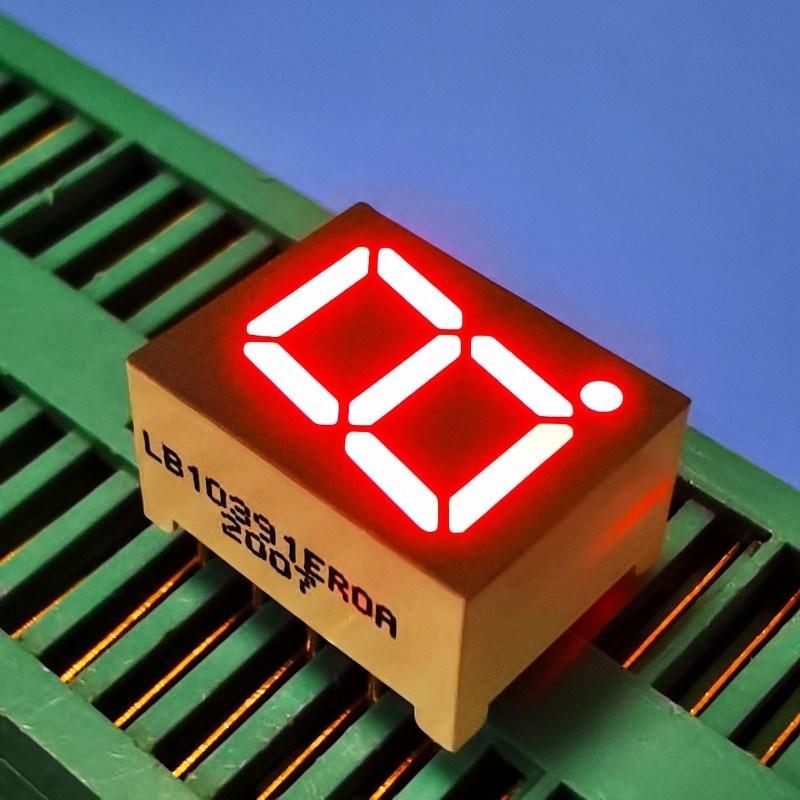
The 7 segment aperture is the opening in the front panel or window through which the digit is seen. Designers often treat it as a cosmetic frame, and then wonder why a display that looked correct on a sample looks trimmed in the finished product. Anything the aperture covers is not emitted toward the viewer, and the part it covers first is the outer edge of each stroke.
Clipping hurts more than it appears to, because it removes the very edges the eye uses to judge shape. A stroke reduced by a fifth in width does not look twenty percent dimmer; it looks softer, and softness at distance is what makes a digit unreadable. The effect compounds at the corners of the digit, where two clipped edges meet.
- Set the aperture to the digit's optical outline plus a defined clearance, and state the clearance on the drawing.
- Check the tolerance stack between the display, the PCB and the panel; the aperture does not move, but the digit does.
- Remember that a diffuser or tinted window inside the aperture shifts the effective edge inward.
- Verify the worst-case assembly, not the nominal one, because clipping is a tolerance problem before it is a design problem.
Good 7 segment display aperture design also protects against light leakage between adjacent digits, which is a separate failure that shows up as a faint ghost segment when one digit is off. The mechanisms are covered in the guide to custom LED display light leakage, and the two issues should be reviewed on the same drawing.
Off-Axis Viewing and the Apparent Stroke
A seven-segment digit is a set of shallow boxes, and each box has walls. Viewed straight on, the viewer sees the emitting face. Viewed from an angle, the viewer sees the face foreshortened and, depending on the package, may also see a wall that does not emit.
The consequence is that the apparent stroke narrows as the viewing angle increases, and it narrows faster for a digit whose stroke is already thin. Products mounted at eye level in a panel are usually viewed within a narrow cone; products on a floor-standing machine, a wall controller or a vehicle dashboard are not. The viewing envelope should be written down before the stroke is fixed, because it is the parameter that decides how much margin the stroke needs.
Ambient light interacts with the same geometry. Under high ambient, the unlit segments reflect the room and the lit ones compete with it; the ratio between lit and unlit is the contrast the viewer actually sees. Widening the stroke raises the lit area and therefore raises that ratio, which is why high-ambient products tend to use proportionally heavier strokes than the same digit height used indoors.
Front-Window Spacing and Contrast
The distance between the emitting surface and the window matters more than it looks. A window sitting directly on the display protects the segments but couples any surface contamination or scratch into the optical path. A window set back a few millimetres creates an air gap that reduces that coupling and softens the edge of reflections, at the cost of a slight widening of the viewed outline.
Window tint is the other lever. A neutral density or colour-matched window raises contrast in bright ambient by reducing the reflected component more than it reduces the emitted one, provided the emitter has brightness to spare. That trade is worked through in sunlight readable 7 segment display, and it changes the stroke decision: a display behind a tinted window can carry a heavier stroke without looking overfilled, because the tint compresses the bright end of the range.
A Readability Test Before Tooling
Readability can be tested cheaply and early, before any tooling is cut. The test needs the intended viewing distance, the intended ambient condition and a printed or sample target at the intended stroke proportion.
- Print or select a target at the planned digit height and stroke ratio, in the planned colour.
- View it at the maximum specified distance under the brightest expected ambient, ideally with the actual window material in front.
- Ask several observers to read random values aloud, and record errors rather than opinions.
- Repeat at the extremes of the viewing angle, since off-axis is where thin strokes fail first.
- Repeat with the aperture mask in place if one will be used, because the mask is part of the optical system.
Record the error rate, not a pass or fail feeling. A stroke that produces occasional misreads at the far corner of the viewing envelope is a specification problem, and it is far cheaper to change a drawing than a mould.
Frequently Asked Questions
How wide should 7 segment strokes be relative to digit height?
Keep the stroke as a stated proportion of digit height and adjust for distance and ambient rather than fixing a millimetre value. The proportion, not the absolute width, is what the eye evaluates.
Can a brighter display compensate for thin segments?
Only up to a point. Brightness raises the contrast of an edge but cannot restore an edge that the aperture has removed or that the eye can no longer resolve.
Why are thin LED segments hard to read at a distance?
Because the lit area inside each glyph shrinks faster than the outline does, so the shape loses the mass the eye uses to recognise it. Atmospheric haze and lens limitations add to the same loss.
Does a wider stroke always improve legibility?
No. Beyond a point the gaps between segments close and similar glyphs become hard to tell apart, which trades one error type for another.
Should the aperture be drawn from the digit outline or from the module outline?
From the digit outline, with an explicit clearance and a tolerance stack. Drawing it from the module outline leaves the visible digit at the mercy of assembly variation.
Does the stroke width change the driver requirement?
Yes, because lit area changes total current at a given current density. The display's current budget has to be recomputed whenever the stroke proportion changes.
Conclusion: Specify the Proportion, Then Protect It
Thin segments are not a stylistic failure; they are a predictable consequence of treating stroke width as a detail to be resolved at tooling. Once the proportion is specified against digit height, the aperture is dimensioned from the digit outline with a real clearance, and the viewing envelope is written down, readability stops being a matter of opinion.
If you are defining a numeric display for a panel and want the stroke proportion and aperture checked against your viewing distance and ambient conditions, send your drawing requirements to the HOUKEM team. The standard ranges are listed on the 7 segment LED display product page, where digit count, digit height and colour options can be compared before a custom drawing is raised.