How to Choose a 7 Segment Display for Digital Meter Products

A suitable 7 Segment LED Display for Meter applications should provide clear readings, stable brightness, reliable operation and easy integration into the final product.
Quick answer: To select a 7 segment display for a digital meter, first define the required number of digits, measurement range and viewing distance. Then evaluate digit height, display brightness, polarity, package type, driving method and environmental conditions before approving samples for production.
This guide explains the key factors engineers should consider when choosing a seven-segment display for voltage meters, current meters, temperature controllers, industrial instruments and other measurement products.
Why Are 7 Segment Displays Still Used in Digital Meters?
Although LCD and other display technologies are widely available, seven-segment LED displays remain a practical solution for many digital measurement devices.
The reason is simple: many meters only need to show numerical information clearly and quickly.
Typical applications include:
- Voltage meters
- Current meters
- Temperature meters
- Frequency meters
- Power monitoring equipment
- Industrial counters
- Control panel instruments
A Digital Meter Display based on seven-segment technology offers several advantages:
Clear Numeric Readability
Seven-segment displays are designed specifically for numbers. Users can quickly recognize values without navigating menus or interpreting complex graphics.
For measurement products, fast recognition is often more important than displaying large amounts of information.
High Contrast in Different Environments
LED displays generate their own light, which allows them to maintain good visibility in many applications.
By selecting the correct:
- LED color
- Brightness level
- Segment design
- Viewing angle
- Front filter
manufacturers can achieve good readability in both indoor and industrial environments.
Simple Integration and Long-Term Availability
For OEM products, component stability is important.
Compared with more complex display solutions, seven-segment LED modules offer:
- Mature manufacturing processes
- Simple driving methods
- Reliable supply chains
- Easy replacement options
- Competitive cost
These advantages make them suitable for products that require long-term production support.
Define the Meter Display Requirements First
Before choosing a display model, manufacturers should define what information the meter needs to show.
Different measurement products require different display formats.
For example:
| Application | Typical Display Requirements |
|---|---|
| Voltage meter | 3–4 digits with decimal point |
| Current meter | Multiple digits with decimal point |
| Temperature meter | Decimal point and degree symbol |
| Frequency meter | High readability multi-digit display |
| Counter meter | Large digit capacity |
Important questions include:
- What is the maximum value displayed?
- How many digits are required?
- Is a decimal point needed?
- Are negative values possible?
- Are special symbols required?
- How far away will users read the display?
Defining these requirements early prevents redesign issues during PCB development.
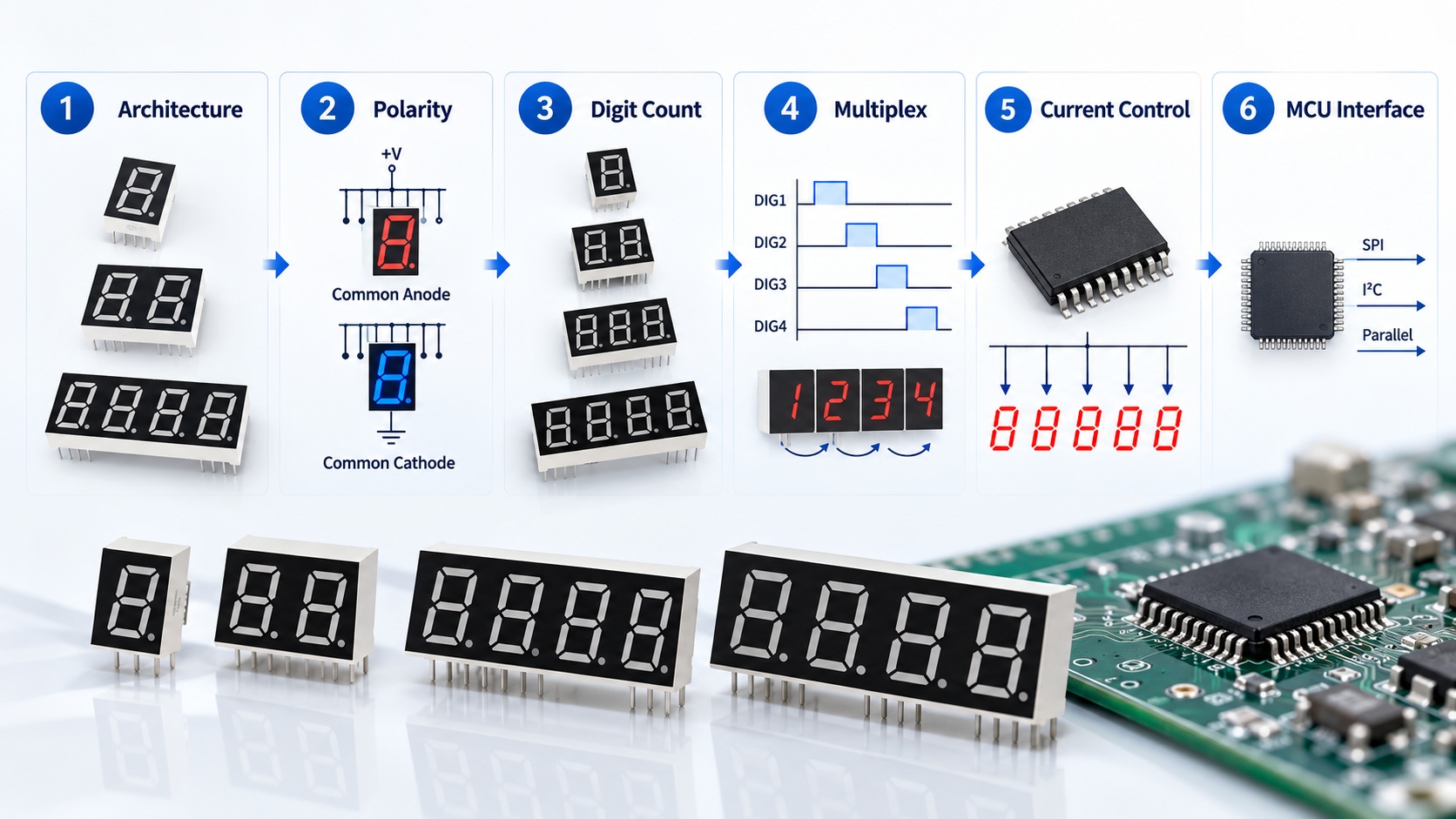
Choose the Correct Number of Digits
The number of digits determines both the measurement range and the physical size of the display module.
A compact meter may only require two or three digits, while industrial measurement equipment often needs four or more digits.
2 or 3 Digit Displays
Commonly used for:
- Basic voltage displays
- Temperature controllers
- Small panel meters
- Simple counters
They provide a compact solution when the measurement range is limited.
4 Digit Displays
A four-digit Multi Digit LED Display is widely used in:
- Digital meters
- Industrial controllers
- Test equipment
- Measurement instruments
It provides more precise readings while maintaining a reasonable module size.
Larger Digit Configurations
Applications requiring higher accuracy or larger measurement ranges may need five or more digits.
However, increasing the number of digits also affects:
- PCB space
- Front panel size
- Power consumption
- Driver complexity
The correct choice should balance measurement requirements with product design limitations.
Select the Right LED Display Digit Height
One of the most important factors when choosing a 7 Segment Display is digit height.
The correct size depends mainly on viewing distance and installation environment.
Common digit sizes include:
- 0.25 inch
- 0.36 inch
- 0.4 inch
- 0.56 inch
- Larger custom sizes
Compact Meter Applications
Smaller displays are suitable when users view the product from a short distance.
Examples:
- Portable testers
- Handheld meters
- Compact electronic devices
Industrial Panel Meter Applications
Industrial equipment usually requires larger digits because operators may view the display from farther away.
Examples:
- Factory control panels
- Machine monitoring systems
- Electrical cabinets
A larger digit height improves visibility but also increases:
- Module dimensions
- PCB requirements
- Front-panel opening
- Product cost
The best selection is not always the largest display. It is the display that remains clear under real operating conditions.
Consider Viewing Distance and Lighting Conditions
The actual installation environment has a major impact on display selection.
A display used inside a laboratory and a display mounted on industrial equipment may require completely different specifications.
Consider:
- Viewing distance
- Ambient light intensity
- Indoor or outdoor environment
- Front panel material
- Viewing angle
- User reading speed
For example, a display behind a dark filter may require higher brightness than an open display.
Testing a sample through the final enclosure is the most reliable way to confirm readability.
Common Anode vs Common Cathode: Which One Should You Choose?
The electrical configuration must match the meter’s control circuit.
The two common options are:
- Common anode
- Common cathode
Understanding Common Anode vs Common Cathode is important before PCB design.
Common Anode Display
In a common anode configuration, the LED segment anodes share a common connection.
The controller activates individual segments through their cathode connections.
Common Cathode Display
In a common cathode configuration, the LED segment cathodes share a common connection.
The controller drives segments through their anode connections.
Neither configuration is universally better.
The correct choice depends on:
- MCU architecture
- Driver IC
- Current sourcing or sinking method
- Existing PCB design
Selecting the wrong polarity after PCB development may require circuit modification, so this specification should be confirmed during the initial design stage.
Choose the Correct Brightness and LED Color
Brightness should match the application environment rather than simply choosing the highest output.
Common LED colors include:
- Red
- Green
- Amber
- Blue
- White
Red LED Displays
Red remains one of the most common choices for meters because it provides strong contrast and reliable visibility.
Green and Amber Displays
Often selected for:
- Status information
- Control equipment
- User interface designs
Blue and White Displays
Used when product appearance or specific design requirements are important.
When selecting brightness, consider:
- Ambient lighting
- Viewing distance
- Front filter
- Operating hours
- Power consumption
A display that is too bright may create glare, while insufficient brightness reduces readability.
Static Drive or Multiplexing for Meter Displays?
The driving method affects circuit design and display performance.
Static Driving
Each segment receives continuous current.
Advantages:
- Stable brightness
- Simple control
- Consistent display output
Disadvantage:
- Requires more driver resources
Multiplexed Driving
Multiple digits share control lines and are refreshed quickly.
Advantages:
- Fewer connections
- Suitable for multi-digit displays
- Lower hardware complexity
However, multiplexing requires attention to:
- Refresh rate
- Duty cycle
- Peak current
- Brightness consistency
A sample tested under static conditions may perform differently in the final multiplexed circuit. Engineers should evaluate the display using the actual driving method planned for production.
SMD or DIP 7 Segment Display for Meter Manufacturing?
Package selection affects both assembly and mechanical design.
SMD 7 Segment Display
Suitable for:
- Compact PCB layouts
- Automated SMT production
- Low-profile products
Advantages:
- Smaller footprint
- Efficient production
- Suitable for high-volume manufacturing
DIP 7 Segment Display
Suitable for:
- Through-hole PCB designs
- Industrial equipment
- Applications requiring stronger mechanical support
Advantages:
- Easy assembly
- Strong PCB connection
- Flexible mounting height
The correct choice depends on the entire production process, not just the display itself.
When Should You Choose a Custom 7 Segment Display?
Standard displays are usually the best choice when they meet the product requirements.
However, a Custom 7 Segment Display may be necessary when a project requires:
- Special dimensions
- Unique segment layouts
- Custom symbols
- Different pin configurations
- Specific colors
- Replacement of discontinued components
OEM customers should provide:
- Digit height
- Number of digits
- Segment configuration
- Polarity
- Brightness requirement
- Operating temperature
- Annual quantity
Early communication with the manufacturer helps determine whether a standard solution or custom design is more suitable.
7 Segment Display Selection Checklist for Meter Products
Before placing an order, confirm the following:
| Specification | Why It Matters |
|---|---|
| Digit height | Determines readability |
| Number of digits | Matches measurement range |
| Decimal point | Supports accurate readings |
| LED color | Affects visibility |
| Brightness | Matches working environment |
| Viewing distance | Determines display size |
| Polarity | Ensures circuit compatibility |
| Package type | Matches assembly process |
| Pin layout | Prevents PCB issues |
| Operating temperature | Ensures reliability |
Final Recommendation
Selecting the right 7 Segment Display for digital meter products requires balancing readability, electrical compatibility, mechanical design and manufacturing requirements.
The ideal display is not simply the largest or brightest option. It is the one that fits the product structure, works correctly with the control circuit and provides stable performance throughout the product lifecycle.
For OEM meter manufacturers, confirming display size, digit number, polarity, brightness, package type and operating conditions before sample approval can significantly reduce development risks.
Need a 7 Segment Display Solution for Your Meter Project?
HOUKEM provides standard and customized 7 Segment LED Display solutions for digital meters, industrial instruments, control panels and electronic OEM products.
Share your required digit height, number of digits, display color, polarity, package type and application requirements. Our team can recommend a suitable display model or develop a customized solution based on your project needs.
FAQs About Choosing a 7 Segment Display for Digital Meters
What size 7 segment display is best for a digital meter?
The best size depends on viewing distance, panel space and lighting conditions. Compact meters usually use smaller digits, while industrial equipment often requires larger displays.
How many digits does a digital meter display need?
It depends on the measurement range and required accuracy. Many voltage, current and temperature meters use three or four digits.
Should I choose common anode or common cathode?
The correct option depends on the driver circuit and controller design. Both configurations are widely used in digital meter applications.
Are seven-segment displays suitable for industrial equipment?
Yes. Seven-segment LED displays are commonly used in industrial meters because they provide reliable numeric output and strong visibility.
When is a custom 7 segment display required?
Customization is useful when standard displays cannot meet requirements for dimensions, symbols, colors, pin layout or special product designs.
What should be checked before ordering a 7 segment display?
Confirm digit height, number of digits, polarity, brightness, package type, electrical specifications and mechanical dimensions before moving into mass production.
How to Choose Red vs Green LED Display
Why 0.25-Inch LED Displays Work Well in Compact Devices