Why 0.25-Inch LED Displays Work Well in Compact Devices

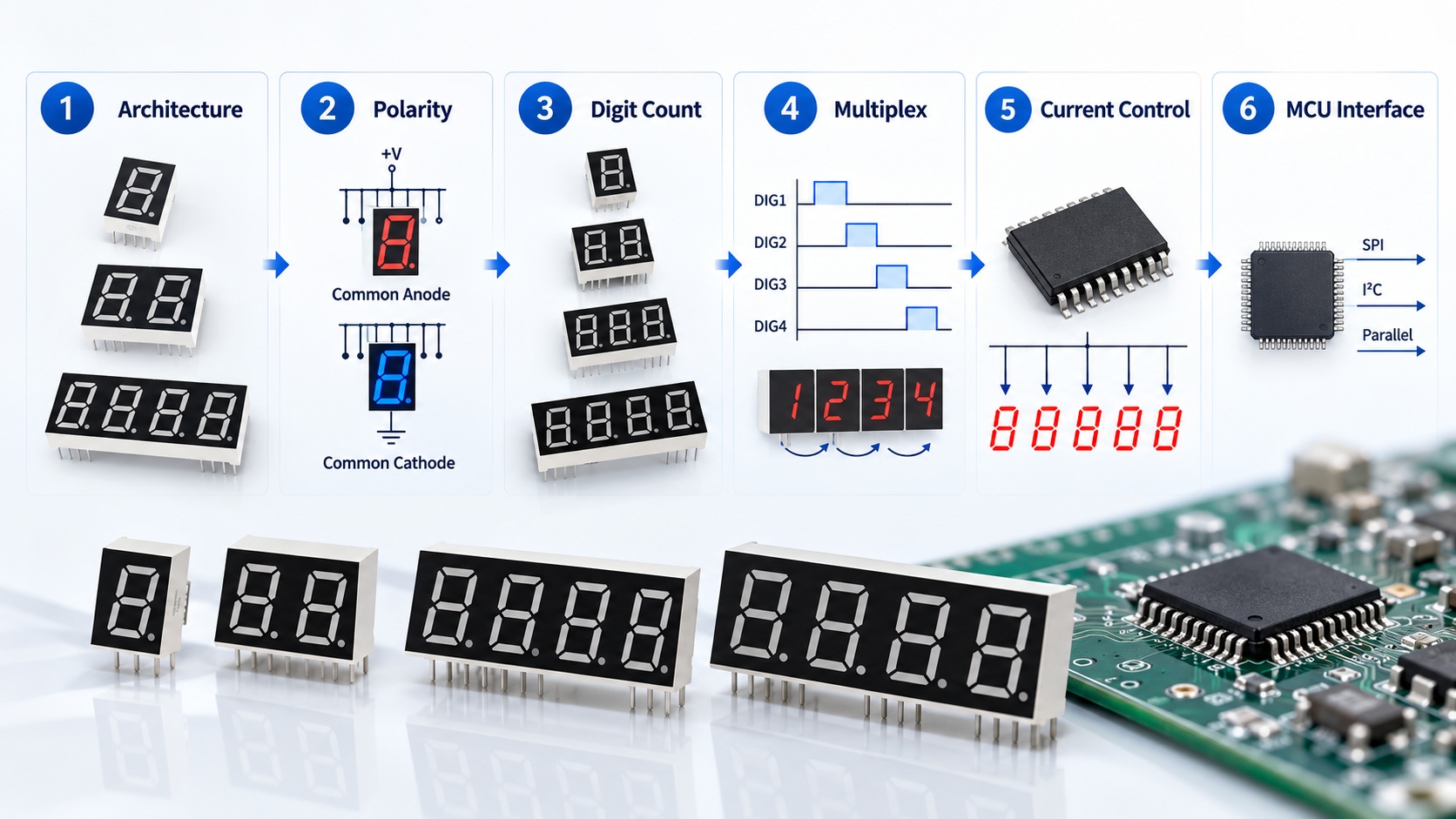
A 0.25 inch 7 segment display offers a practical balance between these requirements. Its digits are large enough for close-range viewing while the overall module remains small enough for compact electronic devices.
Unlike a graphical LCD or OLED, a seven-segment LED display is designed for a focused task: presenting numbers clearly. It does not require a complex user interface, and it can be integrated into many cost-sensitive embedded products.
Quick answer: A 0.25-inch LED display is commonly used in compact devices because it provides a readable numeric output without requiring the PCB and front-panel space of a larger display. It is particularly suitable for meters, timers, counters, controllers and small appliances viewed at close range.
What Is a 0.25 Inch 7 Segment Display?
A 0.25 inch 7 segment display is a numeric LED component in which seven illuminated segments form the digits from 0 to 9. Some versions also include decimal points, colons or additional symbols.
The term “0.25 inch” normally refers to the approximate height of each visible digit, not the overall dimensions of the component. A 0.25-inch digit is roughly 6.35 mm high, although the exact visible area may vary by manufacturer and model.
The complete module will be larger because it also includes:
- The plastic housing
- Segment spacing
- Pin connections
- Decimal points or colons
- Internal LED dies
- One or more digit positions
For this reason, engineers should not select a display based on digit height alone. The full mechanical drawing must be checked against the available PCB area and front-panel opening.

Single-Digit and Multi-Digit Options
The same digit size can be supplied in several configurations, including:
- Single-digit displays
- Two-digit displays
- Three-digit displays
- Four-digit displays
- Custom multi-digit modules
A 4 digit 7 segment display is commonly used for time, temperature, voltage, frequency, counters and other short numerical values.
Using one integrated multi-digit module can simplify alignment and assembly compared with installing several separate digits. It also helps maintain consistent spacing across the display window.
Why Is a 0.25-Inch LED Display Suitable for Compact Electronic Devices?
The main advantage is not simply that the display is small. Its value comes from balancing footprint, readability, electrical simplicity and manufacturing cost.
It Reduces PCB and Front-Panel Space
In compact electronic devices, every part competes for space. The PCB may already need to accommodate a microcontroller, power supply, buttons, connectors, sensors and communication components.
A mini 7 segment display uses less vertical and horizontal space than a larger numeric module. This gives the designer more freedom to position other components or reduce the overall enclosure size.
A smaller display also requires a smaller front-panel opening. This can be important in products such as panel meters, handheld testers and compact control units where the display must fit between buttons, indicators or connectors.
However, a PCB space saving display should still be evaluated using its complete outline, pin pitch and mounting depth. Two products with the same digit height may have different external dimensions.
It Remains Readable at Short Viewing Distances
Compact products are usually viewed from close range. Users may hold the device in one hand, stand directly in front of a controller or read a value from a nearby instrument panel.
At these distances, a 0.25-inch digit can provide sufficient visibility without occupying the space required by a 0.36-inch or larger display.
Readability also depends on factors beyond digit height:
- LED brightness
- Emitting color
- Segment width
- Viewing angle
- Front-panel contrast
- Ambient light
- Display filter color
- Viewing distance
A red or amber display behind a properly matched smoked filter may appear clearer than a brighter display installed behind a low-contrast window.
The display should therefore be tested in the actual enclosure rather than evaluated only when illuminated on an open workbench.
It Fits Thin and Compact Enclosures
The visible digit height is only one mechanical consideration. Module thickness, pin direction and PCB position also affect how easily the display fits inside the product.
A small 7 segment LED display may be useful when the enclosure has limited height between the PCB and the front cover. Depending on the construction, the display may be mounted directly behind a transparent window or positioned through a shaped panel opening.
Mechanical design should account for:
- Module depth
- PCB thickness
- Pin length
- Front-panel thickness
- Display-to-window distance
- Assembly tolerances
- Light leakage between digits
If the module sits too far behind the front window, the viewing angle may be reduced. If it is positioned too close, assembly variation may place pressure on the housing.
It Supports Several Digits Without an Oversized Panel
Many compact devices need to show more than one digit. A timer may require four digits, while a voltage meter may need three digits and a decimal point.
Using larger digits can quickly increase the width of the panel. A 0.25 inch LED display allows several digits to be arranged within a relatively compact area.
This makes it useful for products that display:
- Voltage or current
- Time or countdown values
- Temperature
- Speed or rotational rate
- Production counts
- Frequency
- Equipment settings
- Error codes
The result is a compact LED display that communicates essential information without requiring a larger enclosure or graphical screen.
How Does 0.25 Inch Compare With Other Display Sizes?
There is no universal best digit size. The right option depends on viewing distance, available space and the amount of information being displayed.
| Display size | Main advantage | Typical limitation | Suitable applications |
|---|---|---|---|
| 0.20 inch | Very small footprint | Smaller characters | Extremely space-limited PCB designs |
| 0.25 inch | Balanced size and readability | Intended mainly for close viewing | Compact meters, timers and controllers |
| 0.28 inch | Slightly larger digits | May require more panel space | Compact products needing improved visibility |
| 0.36 inch | Easier to read at a greater distance | Larger module footprint | Appliances and larger control panels |
0.20 Inch vs 0.25 Inch
A 0.20-inch display may be preferable where PCB space is extremely limited. The trade-off is a smaller visible character, which may require stronger contrast or a shorter viewing distance.
The 0.25-inch option provides a modest increase in digit height while remaining suitable for compact assemblies. It is often a more comfortable choice when users need to read values quickly.
0.25 Inch vs 0.28 Inch
The difference between 0.25 and 0.28 inch may appear small, but the complete module dimensions can vary considerably.
A 0.28-inch display may improve visibility slightly, while a 0.25-inch version may fit more easily into an established panel design. Engineers should compare mechanical drawings rather than assuming the difference is limited to digit height.
0.25 Inch vs 0.36 Inch
A 0.36-inch display generally offers better visibility from a longer distance. It may be suitable for appliances, equipment panels and controllers with more available space.
A 0.25-inch display is usually more appropriate when reducing enclosure and PCB size is more important than long-distance readability.
Common Applications of 0.25-Inch LED Displays
The compact format makes these displays useful in a wide range of embedded and industrial products.
Digital Meters and Test Instruments
Small voltage meters, current meters, panel meters and portable test instruments often need to show only a short numerical value.
A mini 7 segment display provides direct visual feedback without the software and interface complexity of a graphical screen.
Timers, Clocks and Counters
Multi-digit modules are commonly used for:
- Countdown timers
- Small clocks
- Production counters
- Frequency counters
- Cycle counters
- Process timing equipment
A four-digit module can show values such as minutes and seconds while keeping the display area relatively narrow.
Household Appliance Controls
Compact household appliances may use numeric displays for temperature, operating time, speed settings or error codes.
Examples include small kitchen appliances, heating controls, cleaning equipment, charging products and portable environmental devices.
Industrial Controllers
A 0.25 inch 7 segment display can also be integrated into compact control modules, DIN-rail devices, embedded panels and machine interfaces.
It is particularly useful when the operator needs to see a numeric setting or process value rather than navigate a detailed menu.
Portable and Battery-Powered Products
LED displays provide strong visual contrast, but they are not automatically the lowest-power display technology. In battery-powered designs, current must be managed through suitable resistors, driver ICs and multiplexing control.
A low power LED display design depends on:
- Required brightness
- Number of active segments
- Drive current
- Multiplexing duty cycle
- Refresh rate
- Ambient lighting
- Operating time
For products that display values only occasionally, brightness can sometimes be reduced or the display can be switched off when not required.
Electrical and Optical Specifications to Check
Selecting the correct display requires more than choosing its size.
Common Anode or Common Cathode
Seven-segment LED displays are usually supplied as common-anode or common-cathode versions.
In a common-anode display, the anodes of the LED segments share a common connection. In a common-cathode display, the cathodes share the connection.
Neither option is universally better. The choice depends on the microcontroller, driver IC and circuit architecture.
The polarity must be confirmed before PCB production because common-anode and common-cathode versions are not always interchangeable without circuit changes.
Forward Voltage and Drive Current
LED color affects forward voltage. Red, amber, green, blue and white segments may require different electrical conditions.
The design should use the manufacturer’s specified:
- Typical forward voltage
- Maximum forward current
- Recommended operating current
- Peak current for multiplexed operation
- Power dissipation limits
Each segment must be current-limited. Directly connecting an LED segment to a supply without suitable current control can damage the component or create inconsistent brightness.
Brightness and Viewing Conditions
More brightness is not always better. Excessive brightness can produce glare at close range and increase energy consumption.
The correct luminous intensity depends on whether the product will be used:
- Indoors or outdoors
- Behind a clear or smoked lens
- In a dim or well-lit environment
- At a fixed or variable viewing angle
Sample evaluation should be completed with the actual front-panel material and expected lighting conditions.
Static Drive or Multiplexing
A single-digit display may be driven statically, with each required segment powered continuously.
Multi-digit displays are often multiplexed. The controller activates one digit at a time at a high refresh rate, creating the appearance that all digits are illuminated together.
Multiplexing reduces the number of control connections but introduces additional design considerations, including duty cycle, peak current and refresh stability.
SMD or Through-Hole: Which Package Should You Choose?
Both mounting styles can be suitable for compact devices.
When SMD Is More Suitable
An SMD package is often chosen for:
- Automated PCB assembly
- Low-profile products
- High-density circuit boards
- Large-volume manufacturing
- Reduced manual insertion work
A surface-mounted display can simplify reflow assembly when the rest of the board also uses SMD components.
When Through-Hole Is More Suitable
Through-hole packages may be preferable when:
- The display must sit above other components
- A specific front-panel height is required
- Mechanical anchoring is important
- The production line uses wave soldering
- The existing PCB is designed around through-hole pins
The package decision should be made together with the mechanical and manufacturing design. A lower-profile package is not useful if it cannot align correctly with the product window.
When Is a 0.25-Inch Display Not the Best Choice?
A small display has clear advantages, but it is not suitable for every project.
Consider another display type when:
- The reading must be visible from a long distance
- The device will operate in strong outdoor sunlight
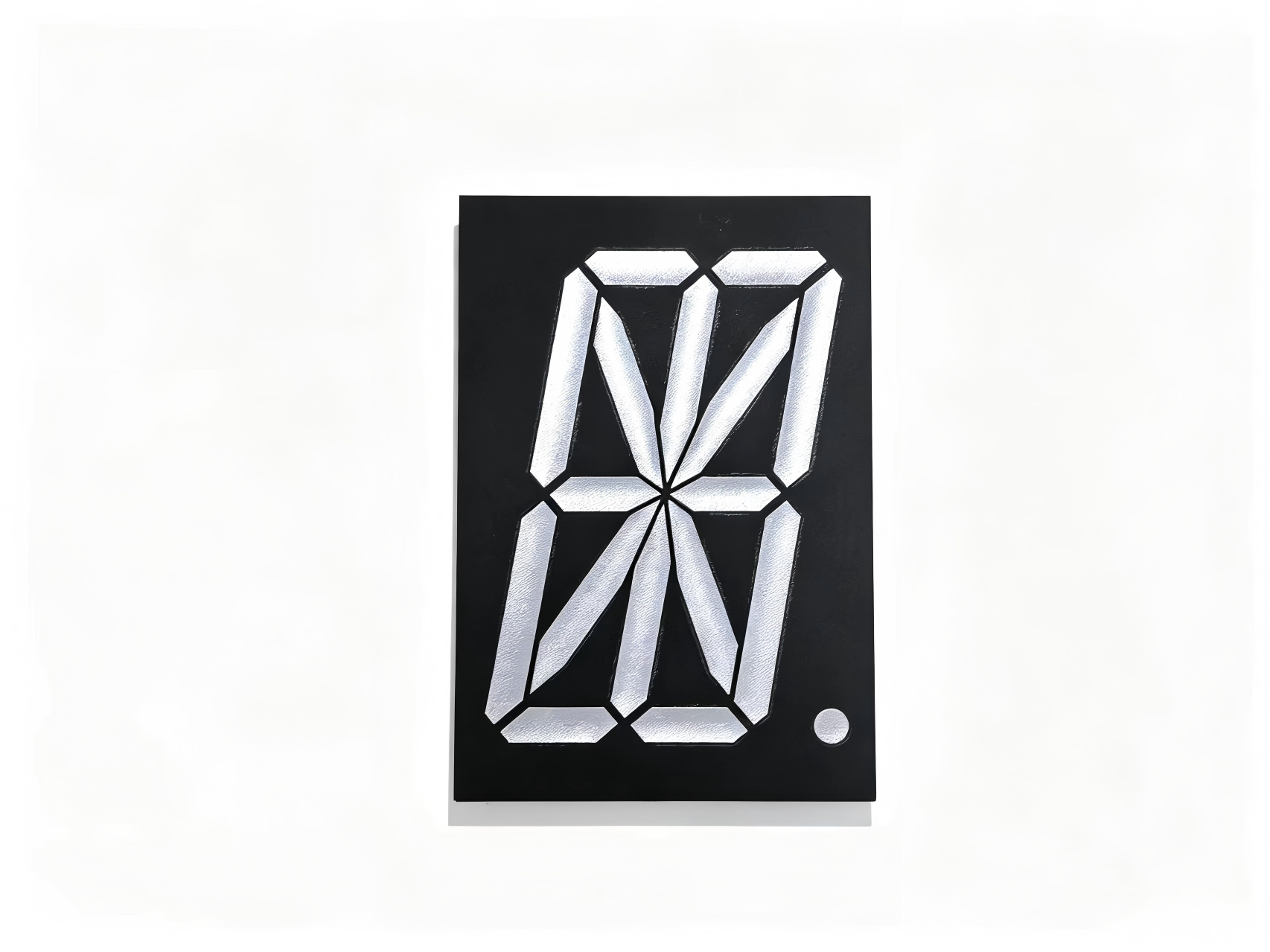
- Letters, icons or detailed messages are required
- Extremely low standby power is essential
- The interface requires graphics or menus
- The enclosure has enough space for larger digits
Larger seven-segment modules may be more suitable for distant viewing. LCD or custom segment displays may be preferred for very low power. OLED and dot-matrix displays are better when the interface needs text, icons or graphics.
The right choice depends on the information the product must communicate.
How to Select a 0.25 Inch 7 Segment Display
A practical selection process begins with the application rather than the catalog.
- Define how many digits and symbols are required.
- Confirm the normal viewing distance.
- Measure the available PCB and panel area.
- Check the complete module dimensions.
- Select common anode or common cathode.
- Choose the emitting color and brightness.
- Decide between static and multiplexed driving.
- Confirm forward voltage and current requirements.
- Choose SMD or through-hole mounting.
- Test samples inside the actual enclosure.
This process helps prevent problems such as unreadable digits, incorrect polarity, mismatched pin layouts and mechanical interference.
Specifications to Confirm With a Manufacturer
Before approving a sample or placing a volume order, confirm:
- Digit height
- Overall dimensions
- Number of digits
- Pin layout and pitch
- Common-anode or common-cathode configuration
- Segment and face color
- Luminous intensity
- Forward voltage
- Recommended operating current
- Viewing angle
- Operating and storage temperature
- Package type
- Moisture and soldering requirements
- RoHS and REACH compliance
- Sample availability
- MOQ and lead time
For an OEM project, the drawing and datasheet should be reviewed together. A product name such as “0.25 inch display” is not enough to confirm mechanical or electrical compatibility.
Customization Options for OEM Projects
A standard product may not fit every enclosure or circuit. A custom 7 segment display can be developed when the project has special requirements.
Possible customization options include:
- Number of digits
- Segment color
- Face color
- Common polarity
- Pin arrangement
- Decimal points
- Colons
- Special symbols
- Logo or face printing
- Luminous-intensity selection
- Module dimensions
- Packaging method
Customization is especially useful when an OEM needs to maintain a specific front-panel design or replace an existing display with a compatible component.
Before requesting customization, provide the manufacturer with the target drawing, electrical requirements, expected annual quantity and assembly method.
Why 0.25-Inch LED Displays Remain a Practical Choice
A 0.25 inch 7 segment display is a practical choice when a compact electronic device needs a clear numeric readout without using excessive PCB or front-panel space.
Its main advantage is the balance between digit readability, compact dimensions and straightforward circuit integration. It is particularly suitable for close-range applications such as meters, timers, counters, appliance controls and industrial controllers.
However, digit height alone should not determine the final selection. Engineers and buyers should also confirm the complete module dimensions, viewing distance, emitting color, brightness, polarity, drive method, pin layout and mounting type.
For OEM projects, testing samples inside the actual enclosure is the most reliable way to verify readability, mechanical fit and electrical compatibility before mass production.
Find the Right Display for Your Compact Device
Share your required dimensions, digit count, color, polarity and annual quantity with HOUKEM. We can recommend a standard 0.25 inch 7 segment display or evaluate a custom display for your OEM project.
FAQs About 0.25-Inch 7 Segment Displays
What does 0.25 inch mean on a 7 segment display?
It normally refers to the approximate height of the visible digit, not the overall size of the module. The complete dimensions depend on the number of digits, housing and pin layout.
Is a 0.25-inch LED display easy to read?
It is generally suitable for close-range viewing. Actual readability depends on brightness, segment color, ambient light, viewing angle and the front-panel filter.
What devices use a 0.25 inch 7 segment display?
Common applications include compact meters, timers, counters, industrial controllers, appliance panels, chargers and portable electronic products.
Is a 0.25-inch display better than a 0.36-inch display?
Neither size is universally better. A 0.25-inch display saves more space, while a 0.36-inch display is normally easier to read from a greater distance.
Should I choose common anode or common cathode?
The correct option depends on the driver circuit and control design. Confirm the polarity with the engineer or display driver datasheet before ordering.
Can a 0.25-inch LED display be customized?
Yes. Depending on order volume and technical feasibility, manufacturers may customize the number of digits, colors, polarity, pin arrangement, symbols, brightness and module dimensions.
How to Choose a 7 Segment Display for Digital Meter Products
Mini 7 Segment Displays in Industrial Equipment: A Complete Selection Guide